AI-First iOS App Development: On-Device AI, App Intents & Foundation Models
A practical guide to building AI-first iOS products with on-device intelligence, Foundation Models, App Intents, SwiftUI, and a production-ready mobile architecture.
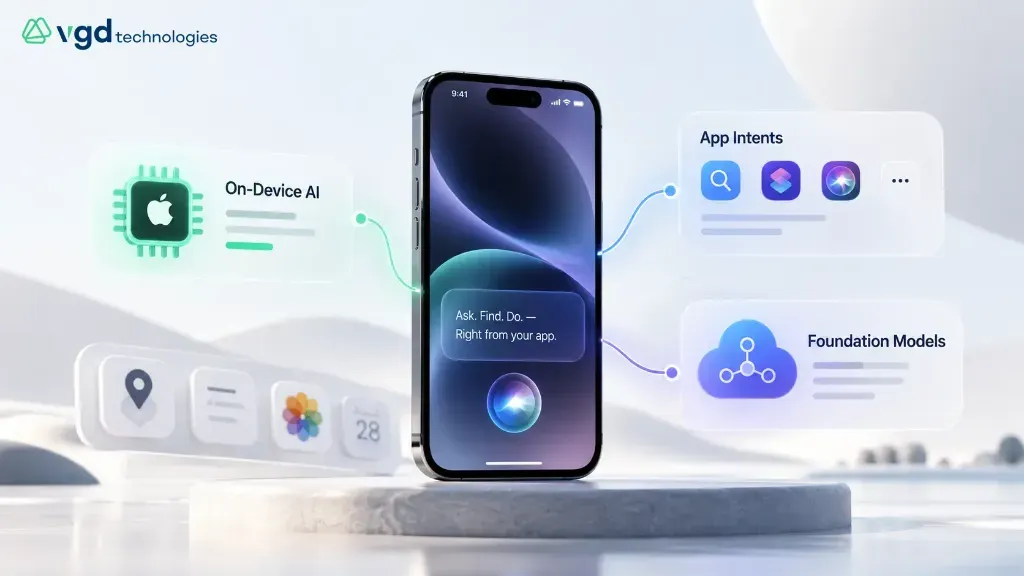
People already expect more from mobile apps than a polished interface. They expect the app to understand context, help them find things faster, reduce repetitive work, and respond in a way that feels natural. That is changing the way teams approach iOS app development.
For a long time, adding AI to a mobile product usually meant sending a prompt to a cloud service and showing the response inside a chat-style screen. That still works for some use cases, but it is no longer the only option. Modern iOS products can combine on-device intelligence, secure cloud processing, App Intents, native search, structured actions, and existing business APIs.
The interesting part is not the model itself — it is what the user can do with less effort. This guide looks at how product teams can use those capabilities without turning every screen into an AI feature or making the architecture harder than it needs to be.
Mobile products are moving toward more natural interaction. Search boxes are becoming more conversational, forms can be partially completed from context, and users can ask for an action instead of hunting through nested menus. Where should intelligence run? What information stays on device? Which actions should be exposed through App Intents? Those questions belong in product planning from day one.
#1AI is becoming part of the iOS product experience
The first generation of AI-enabled apps often treated intelligence as a separate destination. Users opened an AI tab, typed a request, received an answer, and then returned to the rest of the product. Useful AI experiences are starting to feel far less separate.
Imagine a field engineer finishing a site visit. Instead of opening a chatbot and asking it to summarize notes, the app offers a clean summary while the report is being prepared. A travel app reads details from a confirmation photo and adds them to the trip plan. A business app turns 'show overdue invoices from this month' into a structured query. In each case, intelligence supports an existing workflow without forcing the user to think about the model behind it.
- Summarizing short local notes, classifying messages, and extracting structured information from photos.
- Supporting semantic search and text suggestions directly on device with zero network latency.
- Sanitizing, tokenizing, and validating inputs before sensitive data ever leaves the device.
- Preserving privacy and working seamlessly across airplane mode or intermittent cellular connections.
#2Foundation Models changes the way teams plan custom iOS app development
Foundation Models gives developers a native way to bring language-model capabilities into an iOS application. From a product perspective, the key shift is architectural: teams can design intelligence into the app fabric rather than bolting on standalone cloud API calls for every user interaction.
Before building an AI feature, teams must establish clear routing rules across four core questions:
- Can the task run locally? If on-device inference delivers sufficient quality, it eliminates network latency and keeps personal data completely private.
- Does the task need deeper reasoning? Multi-step problem solving or broad knowledge synthesis belongs in a controlled cloud pipeline.
- Does the feature need live business data? Answers about orders, inventory, or customer records must be grounded through secure retrieval APIs rather than hallucinated models.
- Can the feature change anything important? Reading information is low risk; updating records, initiating payments, or deleting data requires explicit user authorization and server-side validation.
- Summarize short local content → On-device intelligence (fast, private, zero data transfer).
- Extract information from an image → On-device tools to reduce cloud API round-trips and cost.
- Search company knowledge → Secure retrieval-augmented generation (RAG) backed by authorized APIs.
- Handle complex reasoning → Controlled cloud workflows suited to expansive context windows.
- Execute high-impact mutations → User confirmation dialogs paired with authenticated server-side checks.
#3App Intents can shorten the path between a user request and an app action
Users do not always want to browse through multiple navigation hierarchies to find something they already know they need. They want to say: 'Show overdue invoices', 'Find the hotel booking near the venue', or 'Add this item to my project checklist'.
App Intents allow an iOS app to register its actions and entities with the operating system in a structured format. This unlocks deep integration with Siri, Spotlight search, Shortcuts, and interactive widgets. For engineering teams, this is primarily a disciplined data-modeling challenge.
- High-frequency actions with unambiguous parameters that are easy to express in natural language.
- Clear entity models with deterministic identifiers, ensuring system search returns accurate results.
- Safe, idempotent operations that can run without fear of destructive unintended side effects.
- Graceful disambiguation flows when a voice or search query matches multiple records.
#4Agentic features can help, but users still need clear control
There is surging interest in autonomous mobile capabilities where an app can interpret goals, select tools, chain actions, and deliver results across multi-step flows. While this unlocks major productivity in enterprise workflows, autonomy without strict boundaries introduces serious reliability risks.
A proven strategy is to segment intelligent features into three distinct operational risk tiers:
- Read-only assistance: Searching, summarizing, classifying, and extracting data (e.g., indexing site reports or reading receipts). Safe starting points because application state is never mutated.
- Actions easy to review: Preparing drafts, prefilling form inputs, or structuring calendar entries. The user inspects and confirms the output before it becomes binding.
- Actions with real consequences: Financial transfers, data deletions, compliance changes, or health diagnoses. These demand mandatory two-factor authorization, explicit review screens, and immutable audit logging.
- Track task completion rate and the percentage of model outputs edited or rejected by users.
- Monitor response latency percentiles (p50, p95) and fallback triggers when models fail to converge.
- Measure inference cost per completed task to prevent cloud expenditure from scaling unsustainably.
- Provide immediate human escalation and non-AI fallback paths whenever an automated intent fails.
#5Native iOS UX still carries most of the experience
A sophisticated AI model cannot salvage a frustrating, unpolished user interface. Users notice sluggish scrolling, confusing navigation, illegible text, and unresponsive controls immediately — long before they appreciate an intelligent feature.
SwiftUI and Apple's Human Interface Guidelines provide a world-class foundation, but design teams must remain uncompromising about core mobile ergonomics: clear visual hierarchies, comfortable one-handed reachability, smooth 120Hz animations, Dynamic Type scalability, and comprehensive VoiceOver support.
- Native iOS fits best when: App Intents, system-level search, on-device Neural Engine inference, or companion watchOS/visionOS apps are primary requirements.
- Cross-platform fits best when: Simultaneous Android and iOS launches are mandatory, UI layouts are uniform, and AI capabilities are mediated entirely via cloud APIs.
#6Best tools and platforms for iOS app development
While the landscape of third-party mobile utilities is vast, the core production toolchain for native iOS engineering is remarkably concise and battle-tested. Xcode serves as the central IDE, Swift provides type-safe, performant application logic, and SwiftUI delivers declarative, accessible interface components.
The professional development stack centers on diagnostic rigor and automated quality gates:
- Xcode: The definitive environment for writing, building, debugging, profiling, and distributing native iOS applications.
- Swift & SwiftUI: Apple's modern programming language and reactive UI framework, delivering high productivity with native performance.
- UIKit: Indispensable for maintaining enterprise codebases, fine-grained view controller lifecycles, and specialized legacy controls.
- iOS Simulator & TestFlight: Fast iteration during engineering paired with structured prerelease distribution for beta cohorts.
- Instruments: Profiling suite for isolating memory leaks, main-thread blocking, energy consumption, and thermal constraints.
- XCTest & Swift Testing: Automated testing suites that guard against regressions as business logic and AI prompts evolve.
#7How to start iOS app development as a beginner
The fastest way to master iOS development is to build and ship one small, complete application. A functional notes app, expense tracker, or habit log teaches more about state management, navigation lifecycles, and storage than months of passive tutorial consumption.
- Learn Swift core concepts: Variables, control flow, optionals, structs, classes, closures, and async/await error handling.
- Install Xcode & run Simulator: Create a starter project and understand SwiftUI previews and compilation targets.
- Build declarative UI with SwiftUI: Compose Lists, Stacks, Forms, and NavigationStacks with responsive layout modifiers.
- Persist state: Implement SwiftData or CoreData to store structured records locally across application restarts.
- Implement accessibility: Test with Dynamic Type scaling, VoiceOver screen readers, and high-contrast color palettes.
- Test on real hardware: Profile on a physical iPhone to evaluate real thermal behavior, camera input, and network latency.
- Deploy to TestFlight: Configure provisioning certificates, privacy manifests, and App Store Connect metadata.
Once these foundations are rock solid, introduce AI deliberately — starting with a small on-device summarization task or an App Intent shortcut that surfaces a single entity in Spotlight search.
#8How much does it cost to hire a freelance iOS app developer?
Freelance iOS developer rates fluctuate widely based on geographic location, domain expertise, and engineering seniority. However, focusing solely on hourly figures can be misleading: two projects with identical screen counts often demand vastly different engineering hours once API integration, security, and store submission are accounted for.
For example, an illustrative contract of 120 hours at $50/hour yields $6,000 for development. Yet that number excludes product design, backend engineering, cloud inference costs, automated testing, and App Store review management. A lower hourly quote often produces a higher total investment when ancillary responsibilities are left ambiguous.
- IP & Source Code Ownership: Ensure complete ownership of repositories, design assets, and developer account access upon delivery.
- End-to-End Scope: Clarify whether backend endpoints, push notifications, and App Store submission support are included.
- Post-Launch Warranty: Establish a defined defect-remediation window following the App Store launch.
- AI Evaluation: When incorporating language models, verify that prompt engineering, fallback testing, and token monitoring are scoped.
#9Build the AI roadmap around user value, not feature count
It is tempting to pack an iOS product with generative novelties to impress executive stakeholders, but user retention depends strictly on removing friction. The most valuable AI features target routine, repetitive tasks: cutting minutes off field inspection reports, surfacing customer records instantly, or prefilling tedious data entry.
Before deploying an AI-enabled iOS update to production, review this operational readiness checklist:
- Architecture: Define explicit local vs cloud execution boundaries, document data flows for App Store privacy disclosures, and implement offline fallbacks.
- Product Behavior: Establish clear refusal policies for ambiguous prompts and maintain normal manual workflows for all core capabilities.
- User Experience: Keep intelligence inline with the task, show progress indicators during inference, and let users edit all generated suggestions.
- Observability & Economics: Track task completion rates, user correction frequencies, latency percentiles, and inference cost per active user.
The takeaway
Modern iOS app development is becoming more intelligent, but the engineering fundamentals have not changed. A successful product still demands a clear user problem, resilient architecture, secure data access, intuitive interface design, reliable performance, and meticulous testing.
On-device intelligence, Foundation Models, App Intents, and cloud reasoning give product teams transformative tools to enhance the mobile experience. The real competitive moat comes from applying these capabilities where they genuinely eliminate user effort.
Start with high-value, repetitive workflows with measurable business outcomes. Keep model boundaries, permissions, and fallbacks transparent. When engineered thoughtfully, the technology stays out of the user's way — delivering an experience that feels effortless and native.
Frequently asked questions
- What is changing in iOS app development?
- More intelligence is moving closer to the app experience. Teams can combine on-device processing, secure cloud models, App Intents, native search, APIs, and structured actions. The main challenge is deciding which approach fits each user task.
- What are Foundation Models in iOS development?
- Foundation Models gives developers a native way to use language-model capabilities in an iOS application. It can support tasks such as text generation, summarization, structured output, tool use, and other intelligent workflows, depending on the device and feature design.
- Can an iOS app use AI without sending every request to the cloud?
- Yes. Some tasks can run on the device. Others may need cloud processing because they require more context, company knowledge, external tools, or stronger reasoning. Many products will use a mix of both.
- Does every iOS app need AI?
- No. AI makes sense when it removes work, improves discovery, helps users complete a task, or creates a capability that would be difficult to deliver with normal application logic. A regular search box, filter, form, or rule-based workflow is still the better choice in many situations.
- Is SwiftUI a good choice for AI-enabled iOS apps?
- Yes, especially for modern native iOS products that need close integration with Apple platform APIs. The choice still depends on the existing codebase, supported devices, product requirements, and the amount of UIKit interoperability required.
- Can a cross-platform app use native AI features?
- Yes. Some features may need native bridges, but a cross-platform product can still use device capabilities and backend AI services. If Apple-specific functionality is central to the product, a native iOS architecture may be simpler.
- How much does AI iOS app development cost?
- The cost depends on the product scope. Important factors include the number of workflows, backend complexity, authentication, integrations, AI model usage, retrieval, security, analytics, testing, and whether the application is native or cross-platform. A focused first release is usually easier to estimate than a broad AI roadmap.
- How should an existing iOS app prepare for new platform requirements?
- Keep dependencies current, test with supported SDKs, review privacy behavior, check accessibility, test the app on supported devices, and review current App Store requirements before each release. Platform readiness works best as a regular engineering practice.
- How should teams test AI features in a mobile app?
- Use real user tasks and realistic edge cases. Test incomplete requests, ambiguous wording, incorrect assumptions, tool failures, and high-risk actions. Track whether users complete the task, correct the output, abandon the flow, or need human help.
- What are the best tools for iOS app development?
- For most native projects, start with Xcode, Swift, and SwiftUI. Use the iOS Simulator and real devices for testing, Instruments for performance analysis, and automated tests to catch regressions. UIKit remains useful when maintaining older apps or building certain specialized interfaces.
- Which programming languages are used to build native iPhone apps?
- Swift is the main language for new native iOS applications. Objective-C is still used in some established codebases. The right approach depends on whether you are building a new app or maintaining an existing one.
- What is the recommended IDE for iOS app development?
- Xcode is the standard IDE for native iOS development. It includes the tools needed to edit, build, debug, test, and prepare apps for distribution. Other editors can help with supporting work, but native iOS releases still rely on Apple's build toolchain.
- How do beginners start developing iOS applications?
- Learn basic Swift, create a small project in Xcode, build a screen with SwiftUI, add navigation and local data, then test on a real device. Finish a modest app before adding advanced AI features or complex integrations.
- Where can I find reputable online iOS app development courses?
- Start with Apple's Develop in Swift tutorials, SwiftUI Pathway, App Development tutorials, and Human Interface Guidelines. Choose lessons that match the current tools and include hands-on projects, debugging, and testing.
- What are the main principles of good iOS interface design?
- Prioritize clear navigation, readable text, predictable controls, useful feedback, accessibility, and layouts that work across screen sizes. Test with larger text, assistive technologies, different appearances, and real devices. AI-generated content should remain easy to review and correct.
- Which iOS app development platform is best for professionals?
- Xcode with Swift and SwiftUI is a strong default for native iPhone and iPad products. For an app that must launch on iOS and Android together, a cross-platform approach may be more efficient. Choose based on device integration, performance, team skills, and maintenance needs.
- How much does it cost to hire a freelance iOS app developer?
- The cost depends on the agreed hourly or project rate, the estimated work, and what is included. For example, 120 hours at an agreed $50 hourly rate equals $6,000 for that work, not a universal market price. Confirm whether testing, API integration, App Store delivery, design, and maintenance are included.
Similar articles
 On-Demand Services
How to Build a Mobile App: Step-by-Step Guide (2026) for Android, iOS & Cross-Platform
Learn how to build a mobile app from idea to App Store and Google Play: requirements, UI/UX, native vs PWA vs Flutter/React Native, testing, launch, and ongoing updates — with practical SEO and product keywords teams actually search for.
 On-Demand Services
Android vs iOS App Development: Which Platform Should You Choose in 2026?
Android vs iOS comparison for product leaders: market reach, development cost, fragmentation, App Store review, monetisation, tech stacks (Kotlin, Swift, Flutter), and when cross-platform wins — with searchable keywords teams use during platform selection.
 Education & EdTech
The Role of Custom LLMs as Personalized AI Tutors
Personalised AI tutors are now a credible product, but generic LLMs hit a ceiling fast. Here is what changes when you build the model around the curriculum.